EngageCX 12.0 (Nido) Release Notes
Summary
The 12.0 release brings a completely new dynamic infrastructure by integrating microservices with our Enterprise Platform. With this release, we are pleased to introduce Vault, an application that ensures that your documents, produced and stored in EngageCX solution, are archived in an efficient manner and can be examined for further reference and regulatory compliance. Also new in this release is the capability to create differential backups and transient jobs.
Over and above, stability and performance improvements have come across the board. As an overall result of the performance tests applied on the Nido Release 2, a consistent growth has been noticed on Direct Render and On-Demand Jobs. From simple to complex projects scenarios, the results obtained were greatly increased with at most 9% to 25% higher than on our previous releases.
One of the best way to improve the EngageCX experience is to run the latest version (Nido Release 3). The performance has considerably increased in Nido Release 3 compared to the previous version. The boost of a 30% has been noticed when running tests on a single machine and a 90% performance increase for the High Availability configuration.
As usual, we have made enhancements to the widely used fields, such as:
- Projects: Communication projects design has been improved from the thumbnail preview of the document to a new button to navigate to the public link sharing.
- Communications: The Communications Details view can now be filtered using built-in filters. You can now configure your documents to display exactly the data users are interested in through the ability to apply one or more filters.
- Journeys: Now you can define different customer journeys and episodes scenarios as the customers' evolution within the organization.
- Online Editors: We have consistently improved the online editing of workflows, templates and emails. The online editors share similarities and have now a more friendly user experience.
Note
By upgrading older EngageCX solutions (for instance, 11.0 - Lillipup, 10.5 - Klink, etc.) to the EngageCX 12.0 (aka Nido) release, the old licenses will be no longer available. To upgrade your licenses, please reach out to your Customer Success Executive, or contact us, at engagecxsupport@mhcautomation.com.
EngageCX
We are pleased to share several enhancements present in the EngageCX solution 12.0. In this section, we've put together a list with all the new features and improvements added to EngageCX solution in this release.
Version 12.4.11
New Features
Lock Service Improvements
An additional High Availability clustering configuration has been brought to the Lock Service. The Active-Active implementation allows to not configure anymore a Lock Service in the Load Balancer. The actively running node will receive the Storage requests. To learn more on how to achieve this, please access the Lock Service section of the Sysadmin Guide.
Version 12.4.10
New Features
Folder Permissions API
In Rest API, folder permissions were implemented. Developers can view or update permissions for a specified folder in the workspace. To learn more on how to achieve this, please access the API documentation.
Bugs Fixed
Function: Forms
Summary: The modified value of a look up field is changed while navigating with tab through others lookup fields.
Solution: The issue has been fixed in this release. The issued binding behavior was handled after removing the repeating items during form validation.
Function: Forms
Summary: A very long title in a repeating section generates an empty line before breaking to the next line. The second line is aligned to right instead of left.
Solution: The issue has been fixed in this release. Some UI artifacts were fixed when long caption is used in repeating of data group fields.
Function: Communications
Summary: In the filtered list of the New Communication dialog, projects appear on each one of the existing workspaces.
Solution: The issue has been fixed in this release. The workspace will be considered when filtering projects in the New Communication dialog.
Version 12.3.7
New Features
Lock Service
A new service with separate executable and log was implemented with this release. The Lock Service facilitates locks on networks in a distributed channel. It helps horizontal scaling and the High Availability mode is improved by this service; the lock services do not synchronize with each other. To learn more about this, please access the Sysadmin\Lock Service documentation.
Version 12.2.6
New Features
Sysadmin
Backend Services
Starting with the Patch 6 version, some new features have been implemented to be configured at domain level. At this level, system administrators can specify settings that apply to only to that domain, not on the whole environment, such as:
- Environment Healthcheck
- Repository Stats Calculator
- Environment Log Maintenance
To learn more on how each of this option can help your organization, please visit the backend services section.
Bugs Fixed
Function: Projects
Summary: When trying to create a new project from a workflow under an environment - other than the default one -, no workflow appears in the drop-down list to be selected.
Solution: The issue has been fixed in this release. The folder permissions were handled with accessible folders.
Function: Workflows
Summary: Render step fails because of a background-image that cannot longer be found in a content fragment.
Solution: The issue has been fixed in this release. The render step was handled when referring an invalid background-image in a content fragment.
Function: Triggers
Summary: An error gets logged in EOS4Svc log file, while running triggers in High Availability conditions.
Solution: The issue has been fixed in this release. The semaphore count exceeded error in HA was handled.
Function: Triggers
Summary: A trigger option is required to target all triggers in a workspace.
Solution: The issue has been fixed in this release. Some items were added to the contextual menu that start and stop all triggers for a workspace.
Function: Projects
Summary: The external fonts should have similar behavior to System fonts. If the bold/italic variant is not found, it should default to regular, while if the bold and italic variant is not found, it should default gradually to bold, italic, then regular.
Solution: The issue has been fixed in this release. The selection strategy for external fonts were improved.
Function: Administrator Settings
Summary: The Healthcheck procedure from Background services should be performed at domain level.
Solution: The issue has been fixed in this release. Healthcheck configurations and Repository calculator were added at domain level with a default value of 1 day.
Version 12.2.5
Bugs Fixed
Function: Forms
Summary: The font-family switches to Times, whenever a hyperlink is inserted in the Form Editor.
Solution: The issue has been fixed in this release. The font keeps its Arial default value when hyperlinks are added.
Function: Jobs
Summary: The files from EngageCX repository are not cached in DAS job.
Solution: The issue has been fixed in this release. Now, streams are cached in Data Engine.
Function: Users/Groups
Summary: Usernames or groups containing more than 30 characters are replaced in the Enterprise Portal by three dots (...).
Solution: The issue has been fixed in this release. Both usernames and groups that contains more than 30 characters within are entirely displayed. In case of very large strings, a trim will be performed.
Function: Administrator Settings
Summary: The domain administrator page is not loading in the latest Nido build.
Solution: The issue has been fixed in this release.
Function: Administrator Settings
Summary: The geographical information of the anonymous visitors is not correctly reported when using a load balancer because the private IP Address.
Solution: The issue has been fixed in this release. The GetClientIP parameter was fixed that allows geographical data to be available when used behind a load balancer.
Function: Jobs
Summary: The Excel results are not cached in DAS job like CSV files.
Solution: The issue has been fixed in this release. Now, cache for Excel in Data Engine is handled.
Version 12.2.4
New Features
Communications
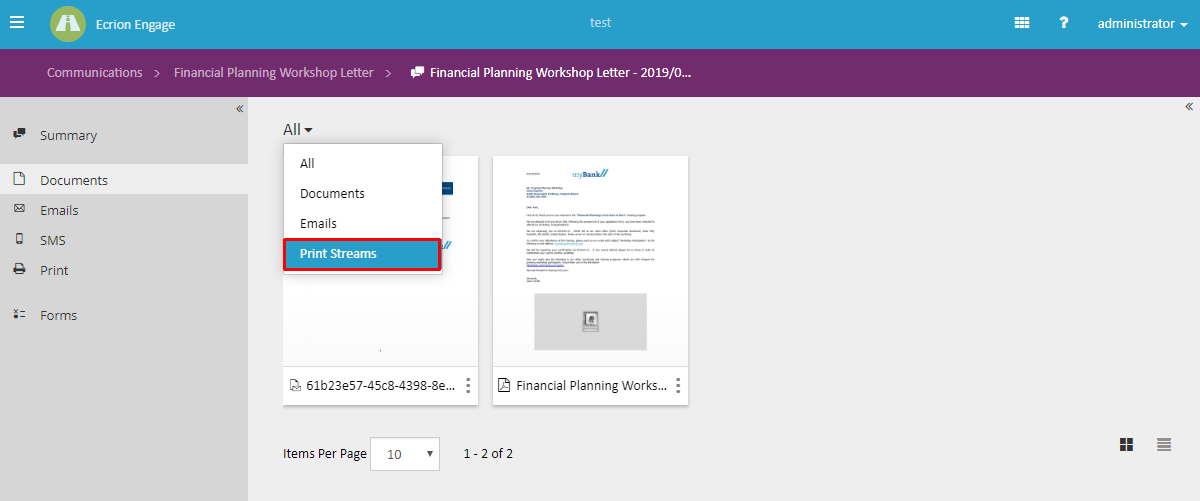
New Filter for Documents
A new filter has been added for the generated documents after running a communication. The Print Streams option filters the results to show only the Adobe Protected Format (.afp) and PostScript (.ps) files.
Communication Filtering
Communication filtering is a completely new feature that helps users to limit the number of communications displayed in the page to view only the ones that present interest to them. Before being able to filter the communications view, some filters have to be configured accordingly.
Bugs Fixed
Function: Projects
Summary: The user cannot select the workspace when publishing to a different server.
Solution: The issue has been fixed in this release. A missing URL was added when multiple publishing had been performed to different servers.
Function: EngageCX Drive
Summary: The "Copy" and "Replace" file operations do not work in EngageCX Drive. Therefore, the files are not updated accordingly in EngageCX.
Solution: The issue has been fixed in this release. Now, when replacing a file on the disk, it would update the file in EngageCX Drive also.
Function: Communications
Summary: The Communications page remains in a "Please Wait" loop. The communication grid is not tolerant with invalid communications.
Solution: The issue has been fixed in this release. When a communication in invalid and the preview is not available, a message will be displayed.
Function: Administrator Settings
Summary: In the EngageCX Sysadmin website, the Product Key Id column is not displayed in the Licensing table.
Solution: The issue has been fixed in this release. The Id column was added in the licensing table.
Function: Administrator Settings
Summary: After performing health check and crawl operations on the environment, some errors are registered in the log.
Solution: The issue has been fixed in this release. A dictionary lock was added when running the healthcheck, to free the object value of that environment.
Function: Communications
Summary: The EngageCX Service crashes when an interactive communication is saved before running.
Solution: The issue has been fixed in this release. As a subscriber emits activity in the template editor, the EngageCX windows service does not stop its process.
Function: Claims
Summary: In the Claims app, the touchpoint names are not displayed.
Solution: The issue has been fixed in this release.
Function: Forms
Summary: The content of the document form toggles and it is not clickable on small devices (with resolution < 767px).
Solution: The issue has been fixed in this release. The padding of the toggle button was increased to be easier to press the "Expand" button on small devices.
Function: EngageCX Cloud
Summary: When templates are uploaded in the EngageCX Cloud version, the timestamp is incorrectly displayed. The timestamp is not the same with the date when the template was effectively uploaded.
Solution: The issue has been fixed in this release. The time difference is of 2 hours because of the action of the Daylight Saving Time (DST). The Coordinated Universal Time (UTC) was under the effect of DST.
Function: Workflows
Summary: The Render step does not throw an error when running the workflow with empty XPATH replacements in output file name.
Solution: The issue has been fixed in this release. The validation of the XPATHs in replacements for complex expressions is added before running the workflow.
Version 12.1.3
Bugs Fixed
Function: Communications
Summary: Sorting by date is not working properly for Communications views. Both ascending and descending sort methods do not work as expected.
Solution: The issue has been fixed in this release.
Function: Administrator Settings
Summary: In the EngageCX Sysadmin website, the timeframe for the Product Key usage is not configured.
Solution: The issue has been fixed in this release. An improvement to show the reset timeframe for the Product Key usage was implemented. Also, the default value is set to be "years" for the reset timeframe.
Function: Contacts
Summary: When creating a lead in a form, it does not specify the gender, yet this parameter is specified as "Male".
Solution: The issue has been fixed in this release.
Function: Tasks
Summary: A task can be approved without filling out the Quote form. Approval to submitting a form should be constrained.
Solution: The issue has been fixed in this release. Task Type UID and Project UID have been implemented to support project as user input for task transaction.
Function: Workflows
Summary: There are too many access tokens for DirectData that could be deleted.
Solution: The issue has been fixed in this release. DirectData is a public API endpoint and now the usage of the total number of the corresponding access tokens is limited improving efficiency.
Function: Workflows
Summary: Reuse the DirectRender tokens when no approval is required.
Solution: The issue has been fixed in this release. The number of temporary access tokens from the database are limited and their efficiency grow through reuse.
Function: Performance
Summary: The user sessions are stored in the EngageCX storage. In case the user does not use correctly the access tokens, the memory is increasing too much.
Solution: The issue has been fixed in this release. Now, the sessions are kept temporary in the memory, not unlimited as before.
Version 12.1.1
New Features
Sysadmin
Backup & Restore
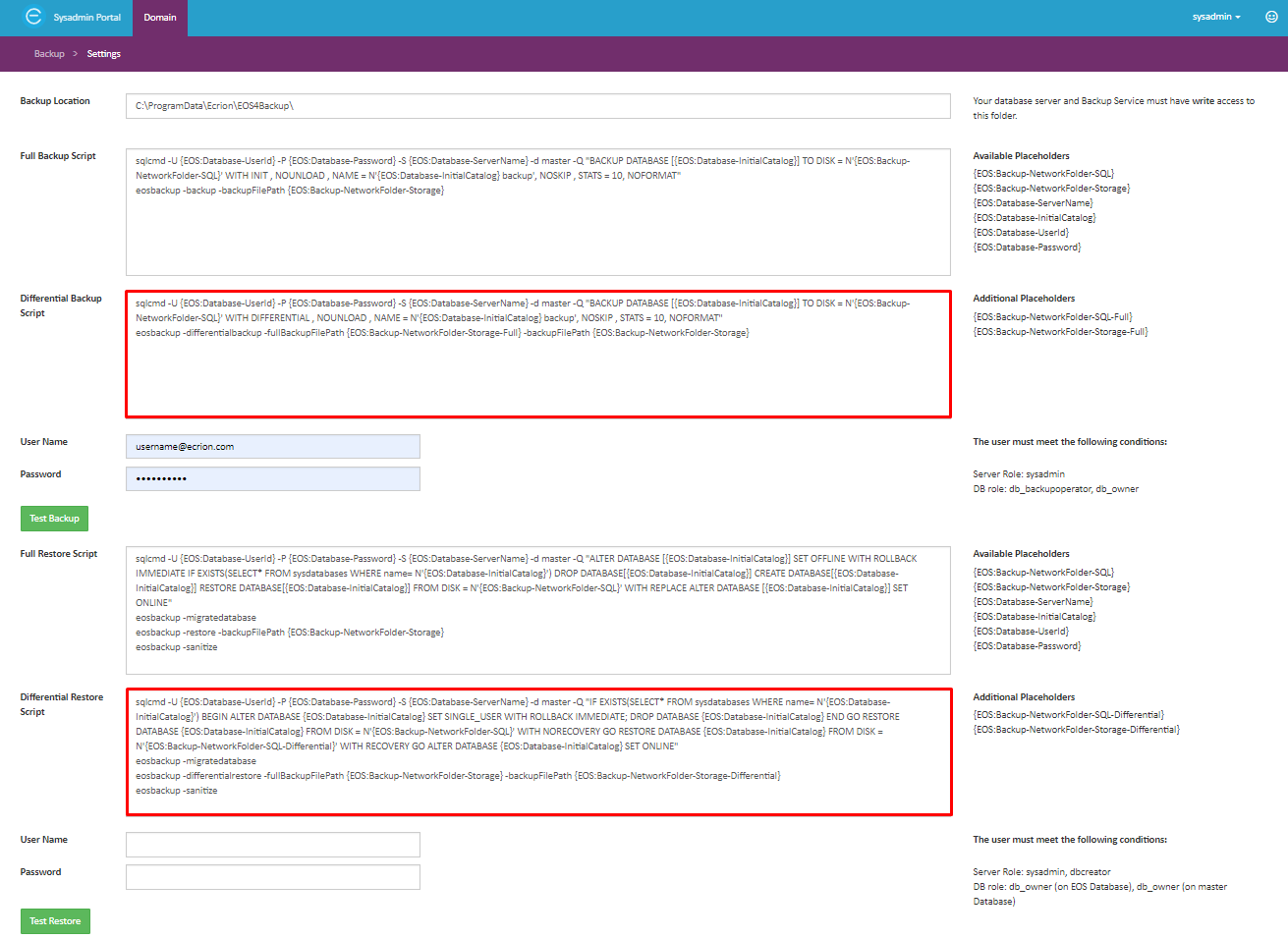
With this release comes a boost in the storage reliance by implementing the map redundancy.
Some backup improvements have been developed, one of them is allowing users to supply a different login name and password at restore time. Test Backup and Test Restore are some utilities that should test user roles and write access for both procedures.
Another step in the backup strategies evolution is the differential backup that is much more quicker and flexible than full backups. This computes back-up procedures only with the files that have been changed since the last full back up completion.
During the restoring process, the system becomes unavailable and it is notified through a warning message alongside the restore status. This System Unavailable page keeps the enterprise user updated while the backup service is performing and also when a database connection is unable to be established.
Projects
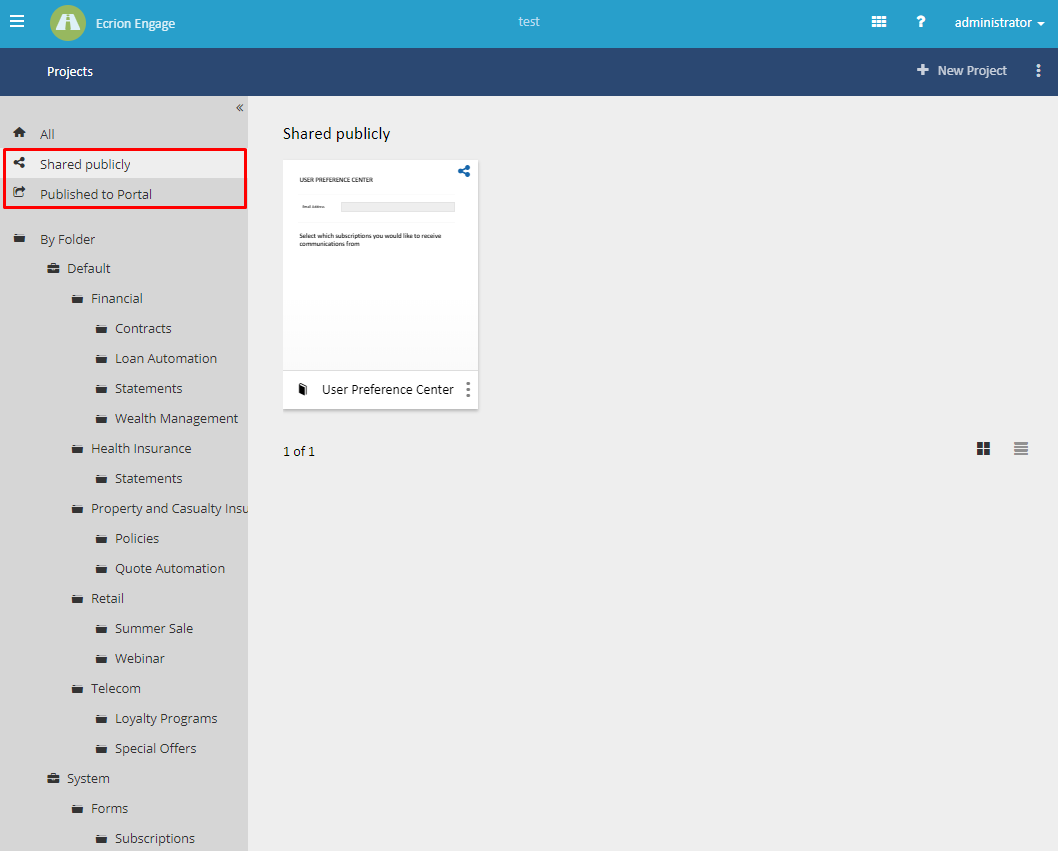
New Filters for Projects
Projects can be filtered now by two more views from the Sidebar. Users can choose between Shared publicly, where the projects are filtered according to their availability to anonymous or other users within the environment, or Published to Portal which is a view displaying only the documents that are published in the Customer Portal.
Communication Dialog
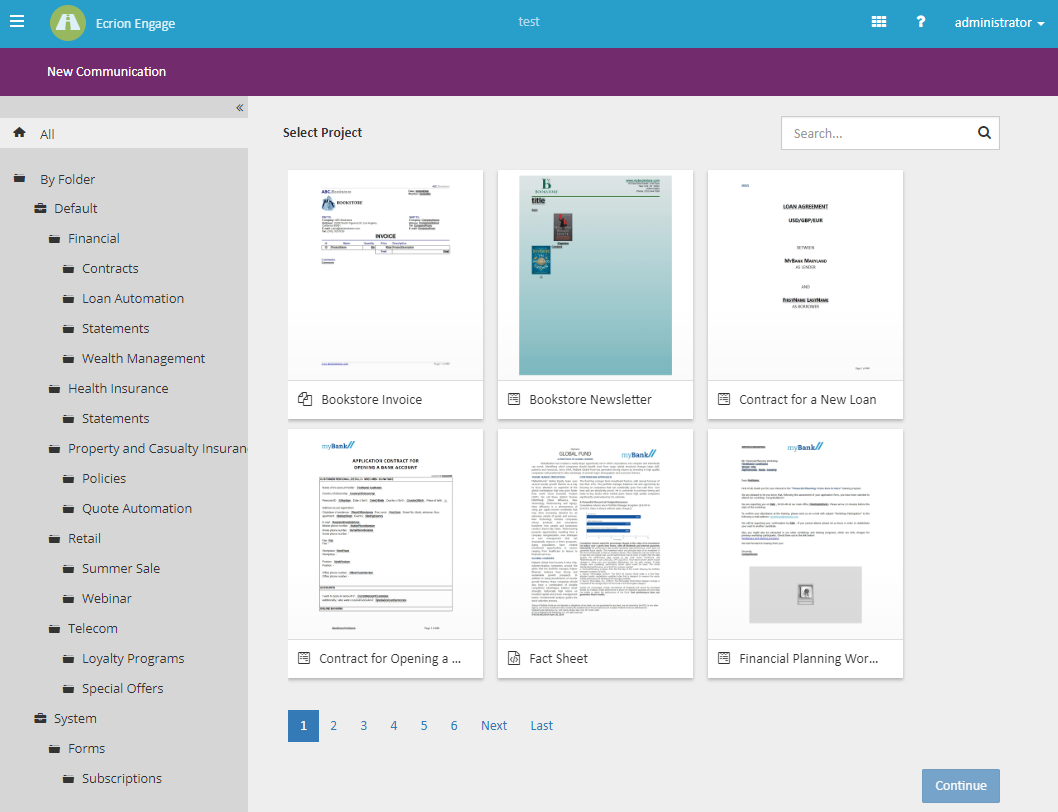
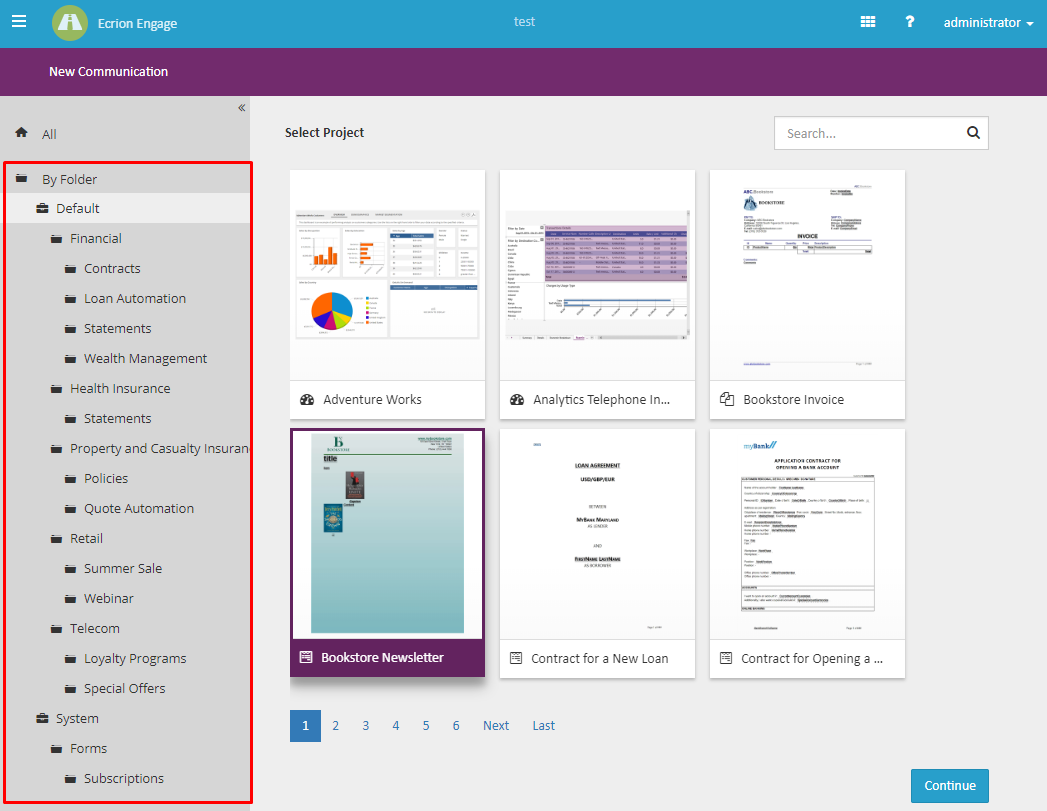
The New Communication dialog has been suffering some changes for better accessibility and volatility between project folders. The ease of using the new page consists in the possibility to access the Sidebar in the left side, due to the fact that the dialog is now opening in a new whole page.
Snapshot Preview
EngageCX solution preserves now the selected folder when going back from a project. In this way, it facilitates the speed in operating with the project's assets.
The Snapshot Preview feature is useful before performing a restore operation, due to the fact that you can instantly get a preview of the version you intend to upgrade. The left Sidebar helps to easily navigate across assets within the project. For a full view of the current version, the Download option can be used.
The purpose of Snapshot Preview is to take a glance at the content of a snapshot before use it as a primary version. It gathers assets from Workspaces, Projects and Tasks in one place. In this way, users can inspect each dependency for a particular version and decide upon the upgrade.
Online Editor
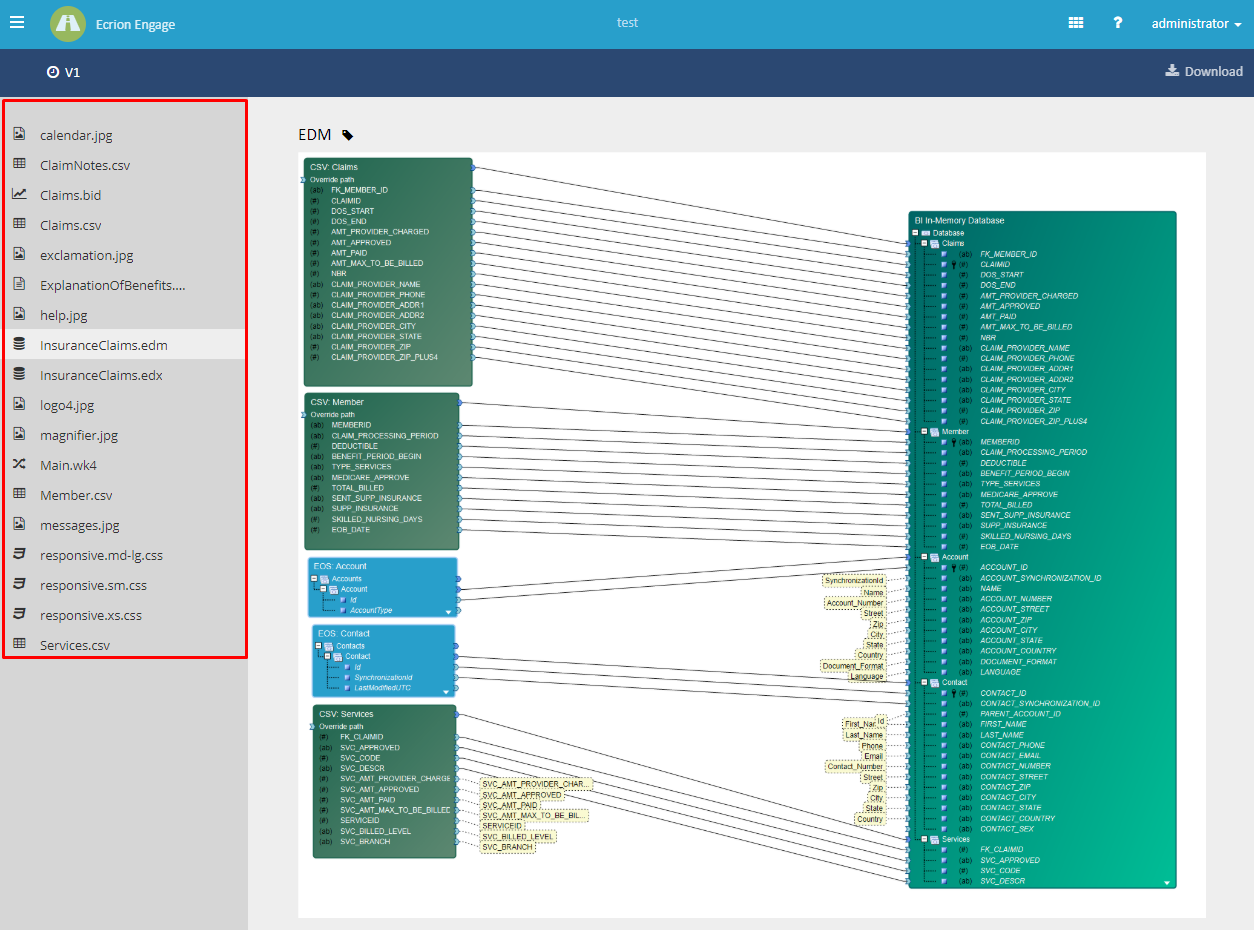
The Online Template Editor can now load editable sections only for the pages visible in the web browser. This supports better editing of large templates. In addition, the data tree only loads a few levels when the data model is very large and allows users to search for certain data points.
Workflow & Jobs
Transient Jobs
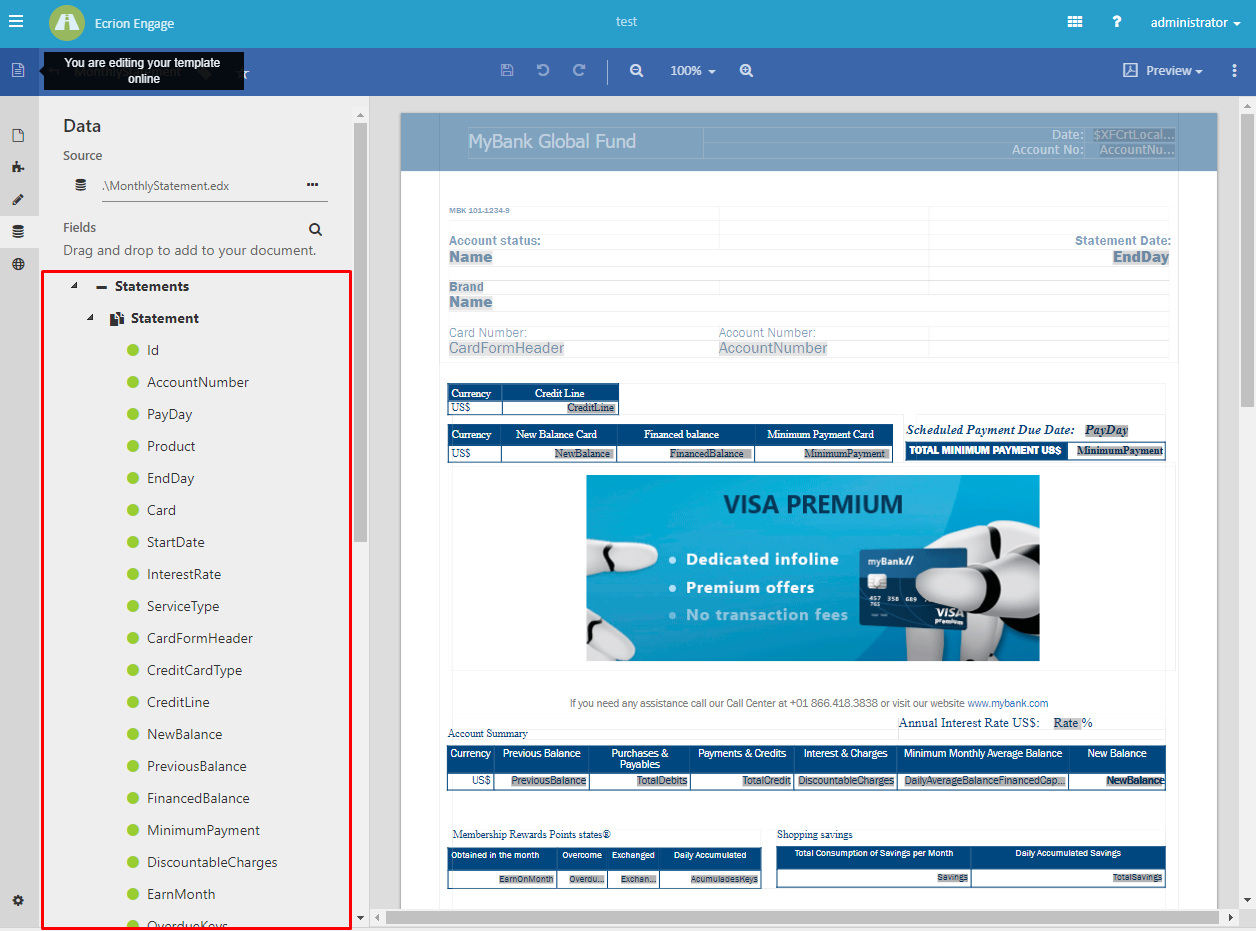
Document production jobs can now be tagged as transient. Transient jobs will cause all the produced output to be stored in an in-memory repository for increased performance. All jobs will be stored in the database and only files will be in a dedicated trunk.
To learn more about Transient Jobs and how to use them, please access the Transient Jobs section of the User Guide.
Propagatable Tags
During the workflow execution, the tag propagation will automatically happen, regardless of the fact that tags have been created with the Tag step or with API calls using the Rest API Inspector. Only the tags whose names are configured in the workflow settings will be available for propagation. These can propagate as long as the workflow logic will allow this. For example, a custom step can break tag propagation and to continue the streaming, the user should re-tag the necessary files using the Rest API.
To learn more about Propagatable Tags and how to use them, please access the Tag step section of the User Guide.
Workflow Steps
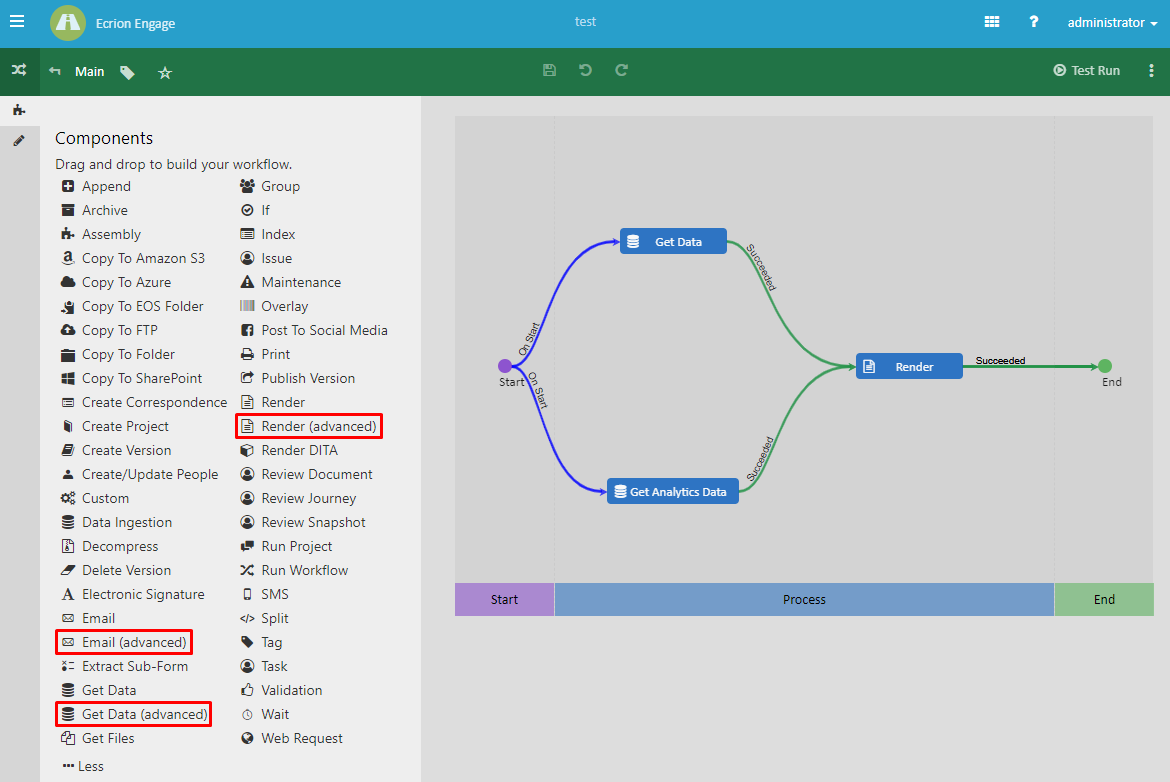
The workflow editor has a new set of simplified tasks to accelerate the creation of workflows when commonly tasks are used (data retrieval, document rendering, email distribution, etc.). The main purpose of introducing the renamed steps (Get Data(advanced), Render(advanced) and Email(advanced) is to help users better design your own workflow analysis.
Engagement
Analytics
Customer Experience is a bit improved by Episode Reports. Reports can be now generated for both episodes and journeys. Another improvement is the contact details filter by marking.
Contacts Activity is included as part of the engagement and the Target Audience is displayed in the narrative for having a better and more detailed perspective about the customer evolution and engagement dependencies. This also shows up in analytics reports.
Journeys
Exporting environments will include all Journey dependencies, besides the entire set of communication projects within including custom task types.
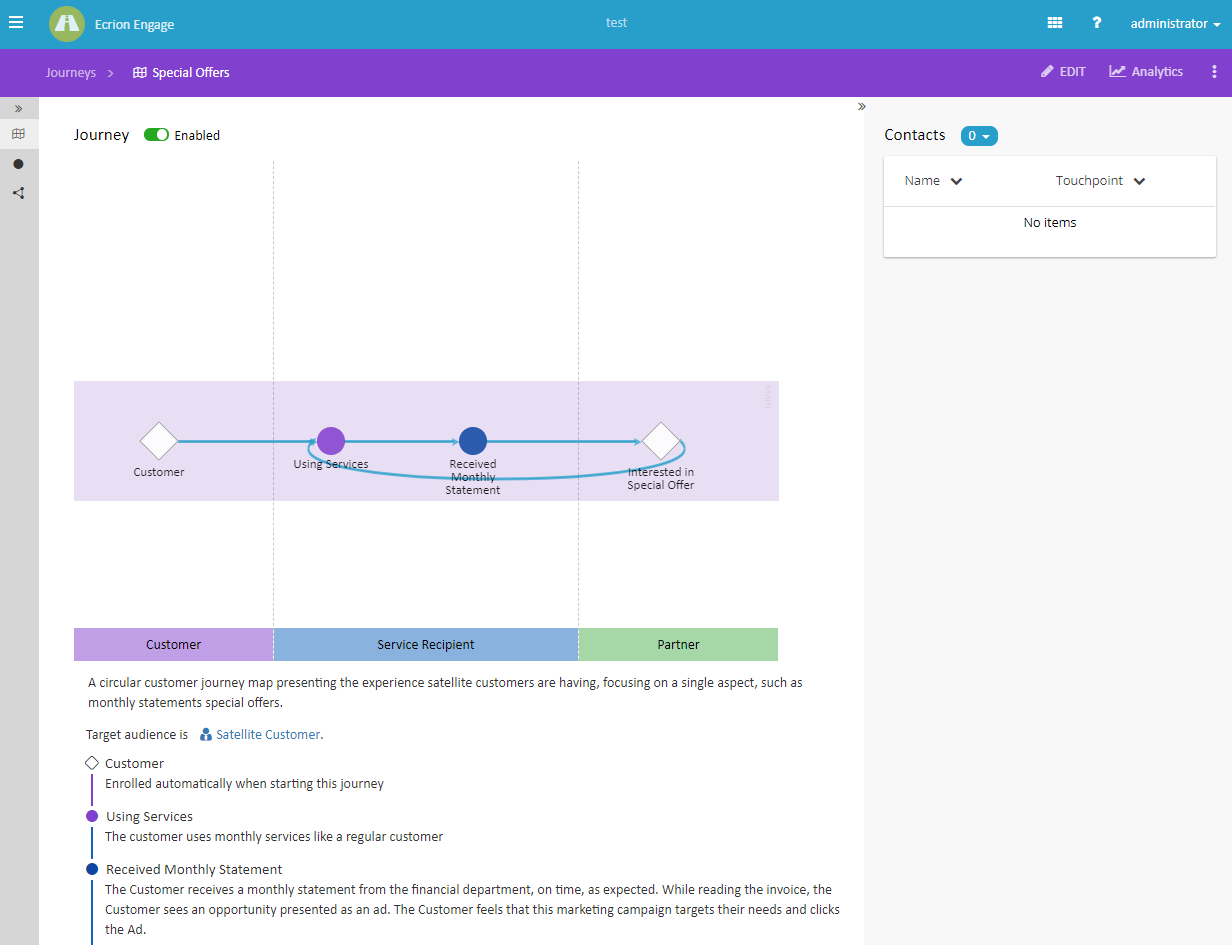
Customer Journeys reveal the experiences that the customers go through by new templates project standardization such as Quote Automation, Loan Automation, Summer Sale, Webinar, Loyalty Programs, etc. These new samples can be found under the Project Ideas section.
Journey Editor
Major improvements are brought to the Journey Editor. For example, when connecting touchpoints, the user is now prompted with checkboxes if the current touchpoint starts or not depending on various triggers (e.g. Email Clicked, Document Created, Task Completed, etc.).
Users are allowed to choose as a trigger only emails sent in that journey and to prevent contacts being enrolled to receive any communication while editing. By default, the journeys and episodes are created disabled.
Journey Narrative
Contacts Count speed is considerably increased together with the loading of the activity history. In the Journey Map preview, the count will be automatically refreshed once every 10 seconds. Additionally, the log size is reduced when working with lots of contacts and events for speed up journey's grid, map and any user interaction.
Subscription
Subscriptions can now be managed from the People tab under the Administrator Settings. For both static and dynamic lists, the opt-out drop-down is implemented to ease the access to subscription management.
Bugs Fixed
Function: Versions
Summary: When try to download the first version of a file, it gets the current version which is the second one.
Solution: The issue has been fixed in this release. When the version was 0 causes the version to be -1 every time the file version is downloaded.
Function: Developer
Summary: An issue is found when deploying Project Ideas that contains a customer journey.
Solution: The issue has been fixed in this release. When deploying a project, now it shows up when a lot of contacts are present in the customer journey.
Function: Administrator Settings
Summary: Storage states retrieval timeout in sysadmin. It takes too long for the sysadmin portal screen to evaluate the storage and to notify if there is an issue with it.
Solution: The issue has been fixed in this release.
Function: Jobs
Summary: When rendering a job, an error is thrown. A transaction process was deadlocked on lock resources with another process and it has been chosen as the deadlock victim.
Solution: The issue has been fixed in this release. A mechanism was implemented to retry if a deadlock occurred. The mechanism must be configured from the sysadmin website.
Function: Workflows
Summary: Render step produces double extension files. When running a job, the render task produces all the PDFs, except one that has a double extension (e.g. MyRenderedFile.pdf.pdf).
Solution: The issue has been fixed in this release.
Function: Rest API
Summary: An incorrect error message is thrown when uploading files within the Rest API. The correct message should state that the filename cannot be found in the path parameter.
Solution: The issue has been fixed in this release. The description of the error is changed accordingly, therefore if the filename is not included, the error will deliver instead of "File name must contain an extension", the following message: "No filename included".
Function: Emails
Summary: Emails are sent even when the email domain is not properly configured. Some of the emails do not failed the validation, even if they have invalid addresses.
Solution: The issue has been fixed in this release. The validation of the email addresses has been extended with the Top Level Domain (TLD) verification.
Function: Communications
Summary: Communications page does not appear in the Enterprise website. When clicking on the Communications module, the 500 error is being returned but the message is not displayed on the screen (e.g. Internal Server Error).
Solution: The issue has been fixed in this release.
Function: Rest API
Summary: An error is thrown when trying to download a large folder (aprox. 5GB). Calling the Repository.ExportFolder method from the Rest API will deliver the following message: "Exception of type 'System.OutOfMemoryException' was thrown".
Solution: The issue has been fixed in this release. A stream with an underlying file stream was added such that when it closes, it deletes the temp zip files.
Function: Notifications
Summary: Accessing the Logging Notification page limits the availability of the fields within - users are unable to select anything even if they are logged in as environment administrators. This behavior is experienced on Internet Explorer only.
Solution: The issue has been fixed in this release. There is a top checkbox entitled "Loggin Notifications" that can enable/disable all the fields in the tab. The placeholder for tags issue is now fixed in Internet Explorer v11.
EngageCX Develop
We are pleased to share several enhancements present in the EngageCX Develop solution 12.0. In this section, we've put together a list with all the new features and improvements added to EngageCX Develop solution in this release.
Version 12.4.12
Bugs Fixed
Function: Rendering Engine
Summary: When there are two different templates uploaded in different path locations, with the same name, the Develop Engine always uses the first uploaded one for rendering documents. The same behavior happens even if the request precisely specifies the second template.
Solution: The issue has been fixed in this release.
Function: Publishing Engine
Summary: Uploading multiple files into the Server's file system generates upload request failures. When sending many concurrent requests to the Develop Server, the Application.config file does not contain all the files uploaded; besides it contains some errors (unrecognized characters at the beginning of the file and duplication of the last line with an extra character).
Solution: The issue has been fixed in this release. The multiple Server templates issue was resolved when the "token" attribute for testing with "curl" disappeared and a few more small changes have been performed.
Function: Publishing Engine
Summary: Direct Render request generates an error when using a template in a subfolder of a workspace. The method call fails only if the template is not referenced in the Application.config file.
Solution: The issue has been fixed in this release.
Function: EngageCX Develop
Summary: When trying to upload a file with the same name that has been updated, therefore it is the newest version of the same file, an error message occurs.
Solution: The issue has been fixed in this release.
Version 12.3.7
Bugs Fixed
Function: EngageCX Develop
Summary: At Direct Render call, the XSLT Engine parameter does not work in the Develop REST API.
Solution: The issue has been fixed in this release.
Version 12.2.6
Bugs Fixed
Function: EngageCX Develop
Summary: When trying to install the latest version over an older EngageCX Develop build, a server exception occurs stating that there is an error in the XML document.
Solution: The issue has been fixed in this release.
Function: EngageCX Develop
Summary: Publishing service should run a thread that loads and updates the config every minute.
Solution: The issue has been fixed in this release. The log level was applied on the fly for the Publishing, Data and Analytics engines.
Function: EngageCX Develop
Summary: When trying to preview a document a null pointer exception is thrown. The error occurs when combining fo:float with text-indent.
Solution: The issue has been fixed in this release. The fo:float structures were changed to fo:table.
Version 12.2.5
Bugs Fixed
Function: EngageCX Develop
Summary: When using Word inputs, the link conversion got an error - the & symbol is replaced by a & - causing a faulty rendered document.
Solution: The issue has been fixed in this release. The Word input URL escaping is handled.
Function: EngageCX Develop
Summary: CSS3 selectors are not supported and cause server exception error whenever generating PDF output.
Solution: The issue has been fixed in this release. Server exception does not occur anymore when generating PDF output, because the CSS3 code was removed from the stylesheet.
Function: EngageCX Develop
Summary: The server stop processing render requests in the 24h grace period when Licensing servers go offline.
Solution: The issue has been fixed in this release. The Licensing service became available and the licensing server downtime was handled.
Function: EngageCX Develop
Summary: There is a memory leak when using images with masks in PDF input files.
Solution: The issue has been fixed in this release.
Function: EngageCX Develop
Summary: The DAS log messages should be refactorized.
Solution: The issue has been fixed in this release. Log message improvements have been performed.
Function: EngageCX Develop
Summary: When using PDF508 conformance, figure elements are missing the bounding box.
Solution: The issue has been fixed in this release. The invalidated documents rendered using PDF508 checker were handled.
Function: EngageCX Develop
Summary: Converting docx to PDF with PDF508 conformance does not set alt-text on links or correctly convert tables and headings.
Solution: The issue has been fixed in this release. The link, headings and tables are correctly converted in the PDF508 tagged structure.
Function: EngageCX Develop
Summary: Artifacts are present inside the tagged content when converting a PDF using PDF508 conformance.
Solution: The issue has been fixed in this release. The basic-link underline as artifact for PAC3 was handled.
Function: EngageCX Develop
Summary: When merging PDFs, the tasks that render print files are very slow.
Solution: The issue has been fixed in this release. The ICCBasedColorSpaceCache was added to speed up the ICC Color space reading for print production.
Version 12.2.4
Bugs Fixed
Release: 12.0 Released On: November 2018
Function: EngageCX Develop
Summary: The width and height of the image set up in the XML input is not considered in the output when using is-html flag.
Solution: The issue has been fixed in this release.
Function: EngageCX Develop
Summary: When generating AFP files, there are 4 slots of black color (~ 2mm) around the pages (each one per page side), like non-printable areas. Black lines are created around the pages in AFP output prints.
Solution: The issue has been fixed in this release. The paths in AFP output were rastered.
Function: EngageCX Develop
Summary: If the output format of the Direct Render method is set to be HTML, the template parameters are not picked up if these are not defined in the template as lower case.
Solution: The issue has been fixed in this release. The Template Parameters object in the Render API are not case sensitive anymore.
EngageCX Studio
We are pleased to share several enhancements present in the EngageCX Studio solution 13.0. In this section, we've put together a list with all the new features and improvements added to EngageCX Studio solution in this release.
Version 14.4.10
New Features
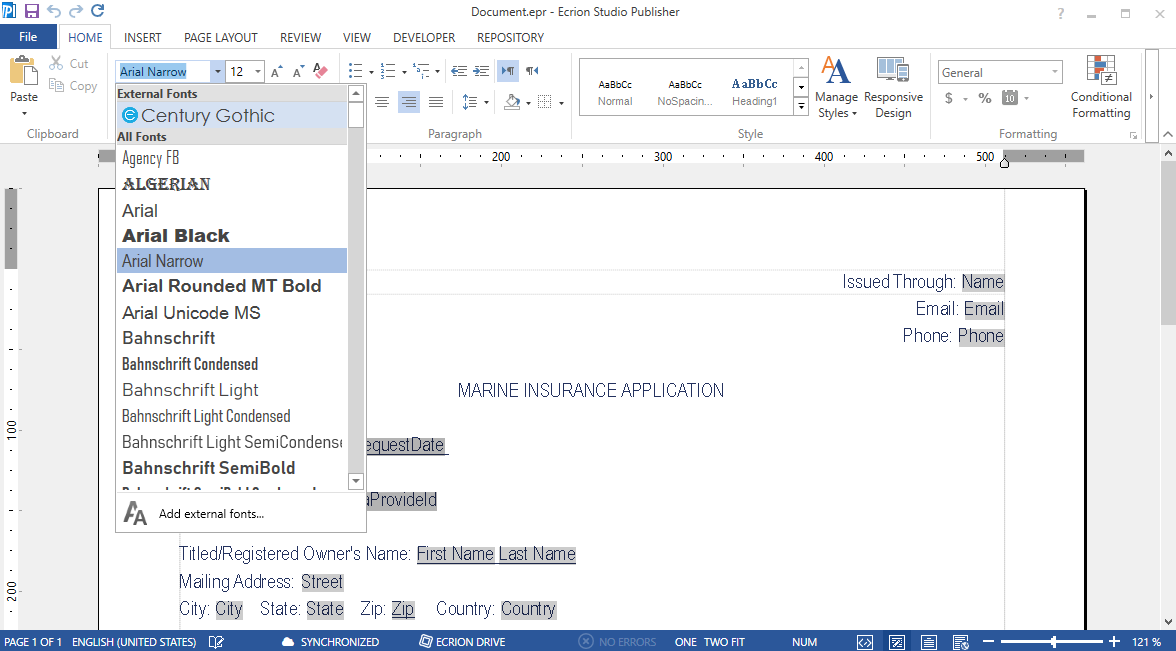
External Fonts
Any font file uploaded in the Fonts folder of a workspace, it will now be available in the Fonts drop-down list headed by the EngageCX's logo. The Engage solution must be synchronized with EngageCX Drive and the document template have to be opened using the Drive tool. To learn more how to achieve this, please access the Publisher Fonts documentation.
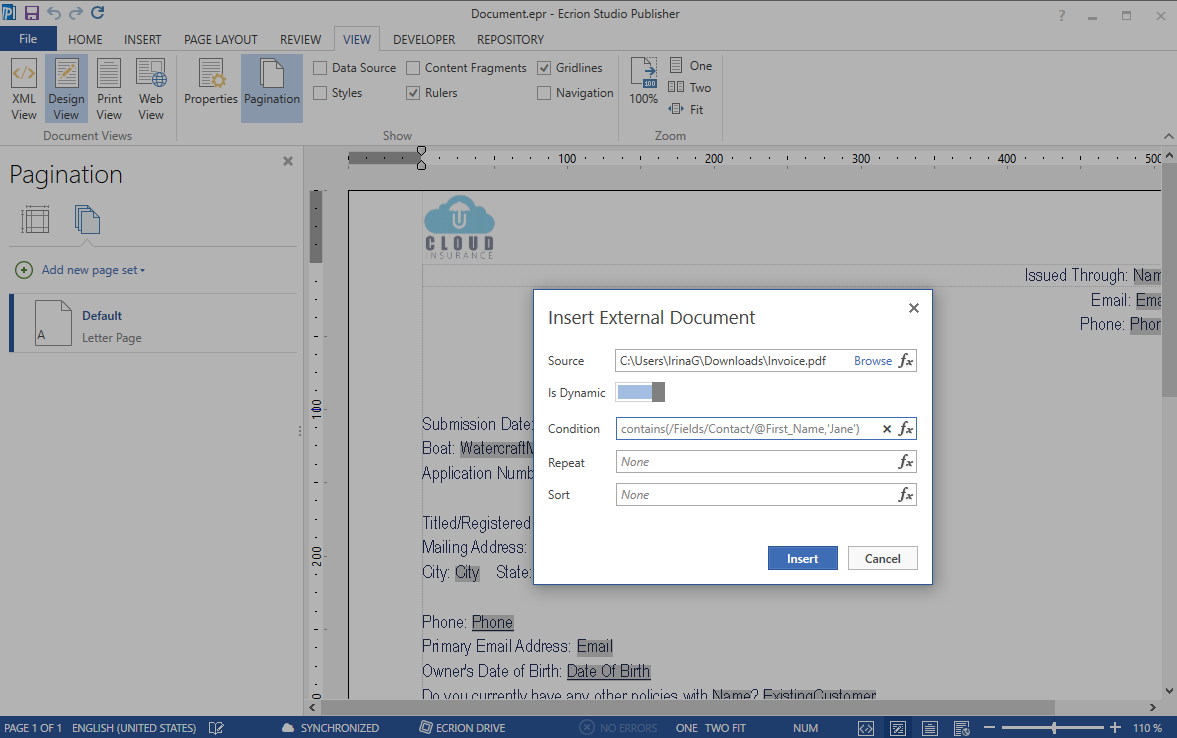
External Documents
External Documents uploaded in a document template can be inserted either static or dynamic page sets. Find out more by accessing the Publisher External Documents documentation.
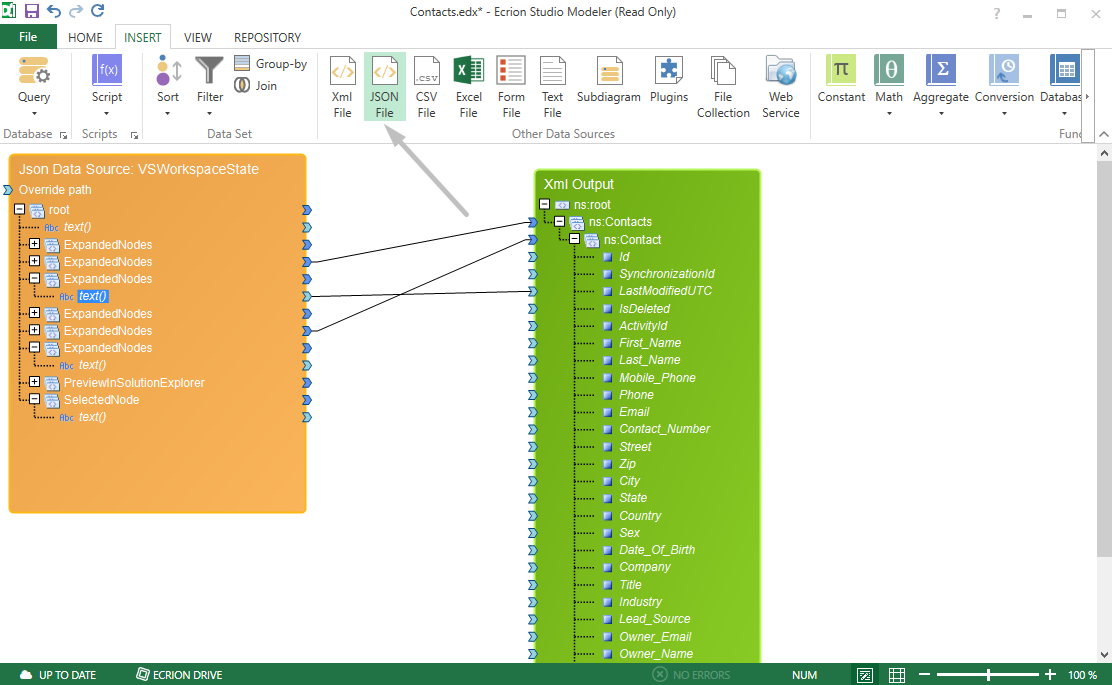
JSON Data Source
The JSON input for diagrams is now available. It allows you to upload a JSON file ,locally, as a data source and retrieve data from it. Find out more by accessing the Modeler JSON Input documentation.
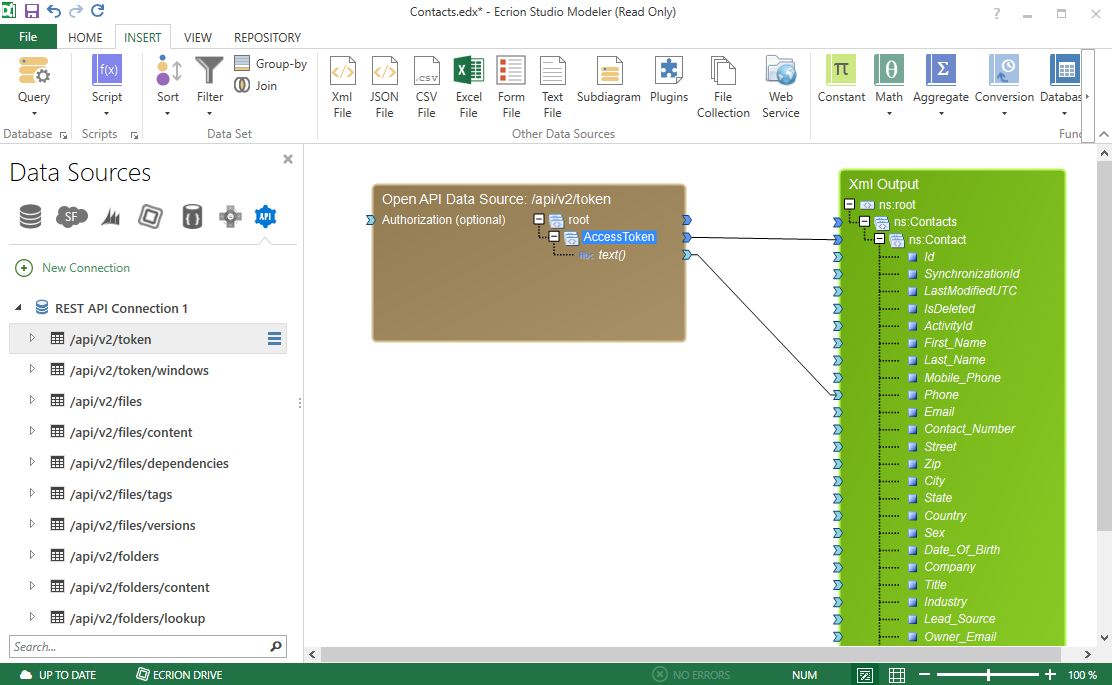
REST API Data Source
The REST API Data Source is now implemented in EngageCX Modeler and it enables access to data from any server that implements Open API Protocol (e.g. EngageCX REST API). The data is retrieved and used as input in your diagrams. Find out more by accessing the Modeler REST API Connection documentation.
Bugs Fixed
Function: Publisher
Summary: When the Keep & Breaks option is set to Auto or Always, the parameter resets everytime showing numbers on previewing the output.
Solution: The issue has been fixed in this release. The UI issue was resolved when the buffer attribute value is different from the displayed value.
Version 13.3.7
New Features
EngageCX Drive
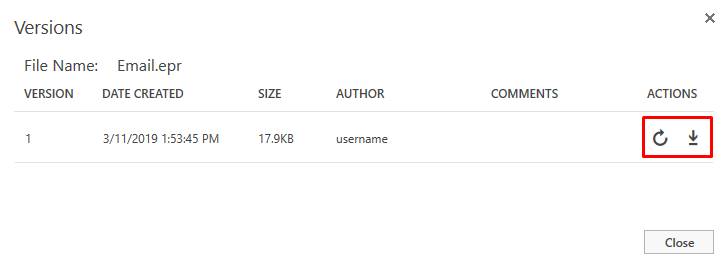
For any file within the project folders stored in EngageCX repository, there is a new option implemented for empowering the accessibility between different versions of the same file. There are also some actions that can be performed on previous versions, such as Restore or Download. These features can be accessed from the EngageCX Drive UI.
Version 13.2.6
Bugs Fixed
Function: EngageCX Drive
Summary: If a previous template version is downloaded from the EngageCX Drive UI and compared with the latest version available in the local folder, there are no differences between the two files.
Solution: The issue has been fixed in this release.
Function: Modeler
Summary: Performance issue has been noticed due to the large number of elements from the XML schema. In addition, subtree filtering in Modeler displays results only for the first item.
Solution: The issue has been fixed in this release.
Version 13.2.5
Bugs Fixed
Function: EngageCX Drive
Summary: The search by name and description should be implemented when selecting the workspace, similar with the one in Enterprise Portal behavior.
Solution: The issue has been fixed in this release. Now, when selecting the workspace in EngageCX Drive, there is a search box in the drop-down list that supports both searching by name and description.
Function: Publisher
Summary: The option to insert an image into a HTML page, using a URL link is not available. Currently, the entire image contents are being embedded into the HTML page.
Solution: The issue has been fixed in this release. A parameter was added to preserve the HTTP image URL in the output.
Version 13.2.4
New Features
With this release, we increase the offline working time of the EngageCX Studio to 24 hours from the moment when application starts. You will not be disturbed anymore by warnings that require an internet connection, only after this period.
Bugs Fixed
Function: Publisher
Summary: Publisher tool does not recognize all typefaces for fonts loaded from the Fonts folder in EngageCX Repository.
Solution: The issue has been fixed in this release. Now, all the typefaces are recognized by the Publisher tool. After adding a bold/italic property to a font, the text changes accordingly.
Function: Modeler
Summary: After changing the username used in a BPM Connection diagram in Modeler, an error is received. The new modified credentials cannot connect with the BPM Online connection.
Solution: The issue has been fixed in this release. The connection must be redefined with the current username.
Version 13.1.1
New Features
EngageCX Publisher
The loading speed is consistently improved together with the online templates from the Home page.
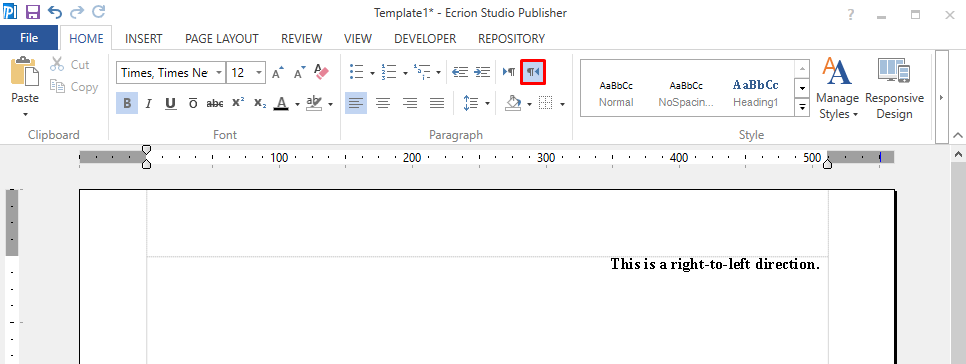
Arabic text support in Design View has been improved in EngageCX Studio for better ligature availability. Additionally, the right-to-left editing is now available within the Publisher tool.
EngageCX Modeler
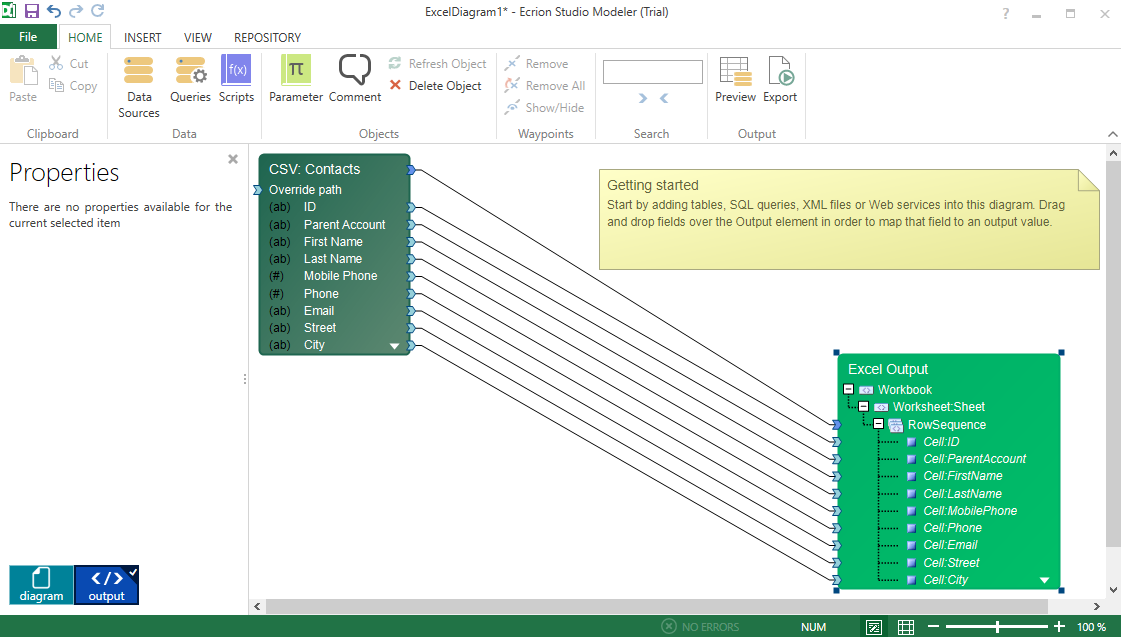
The new release brings a new output object for the diagrams developed within the Modeler tool. Now, users can generate the structure of an Excel spreadsheet document out of ordinary data sources. For obtaining directly .xlsx files, use the Export feature and if you want to generate more complex templates as Excel workbooks you can save the diagram (.ede) and use it as the primary data source for a workflow.
Bugs Fixed
Function: Publisher
Summary: Publisher tool is unable to add map to PDFs. The information from Google is not retrieving the mapping.
Solution: The issue has been fixed in this release. Starting with November 2018, Google Maps are not working anymore without an API key, therefore to continue to use maps in EngageCX Studio, a new API key from Google should be provided.
Function: EngageCX Studio
Summary: The DocuSign Signature is wrong positioned. The DocuSign does not replaced the signature and the timestamp in the place where it should be. For example, the document signature is placed on Page 3, but when running the workflow, the DocuSign appeared on Page 1.
Solution: The issue has been fixed in this release. The date and signature widgets do not overwrites other places in the document than the allocated positions.
Performance Improvements
With this release, we have continued to sustain and improve the performance and reliability of our products. Loading Projects from the Sidebar in the New Communications page is faster, starting with the Patch 1 version. Communications can now be easily accessed and changed in the last minute with no extra loading time.
A new set of optimizations has been implemented in order to streamline working with large number of projects (over 10,000) and communications/jobs (over 1,000,000,000).
Avoiding deadlock when performing a crawl while having 36k users, 12k groups and 6k workspaces is another improvement that comes up together with the new release. Healthchecks and Search crawls can be performed with no deadlock warnings or latency registered in the log. Keeping the same register of deadlock, a method was added in the healthcheck to have the number of API calls as environment settings at creation time. Now, no deadlock occurs during Direct Render running.
When automatic synchronization happens in Studio Drive, the number of API calls have been reviewed and minimize. Therefore, the performance has improved by improving the Interoperability API with Enterprise Platform.
Another improvement that has risen the running speed of a workflow is implementing diagram caching for EngageCX requests. Whenever a workflow that contains an .edx diagram is run, the Data Engine loads the diagram once and after that it keeps the data diagram in memory.